
Grok Imagine 1.5 Video Generator
Grok Imagine 1.5 Video Generator transforms short prompts or reference images into realistic, share-ready videos with native audio and industry-leading image-to-video quality.
Feedback
AI Tools
Explore AI tools
MiniMax H3
MiniMax H3 AI Video Generator
Seedance 2.5
The Future of AI Video Is Here.

Seedance 2.0
The Future of AI Video Is Here.

Veo3.1
Create Stunning Videos with Veo3.1
FLUX 3 Video Generator

Kling 3.0
Next-Gen AI Video Generator
Grok Video Generator
Create Videos from Text or Images with AI
MiniMax H3 video generator
MiniMax H3 AI Video Generator
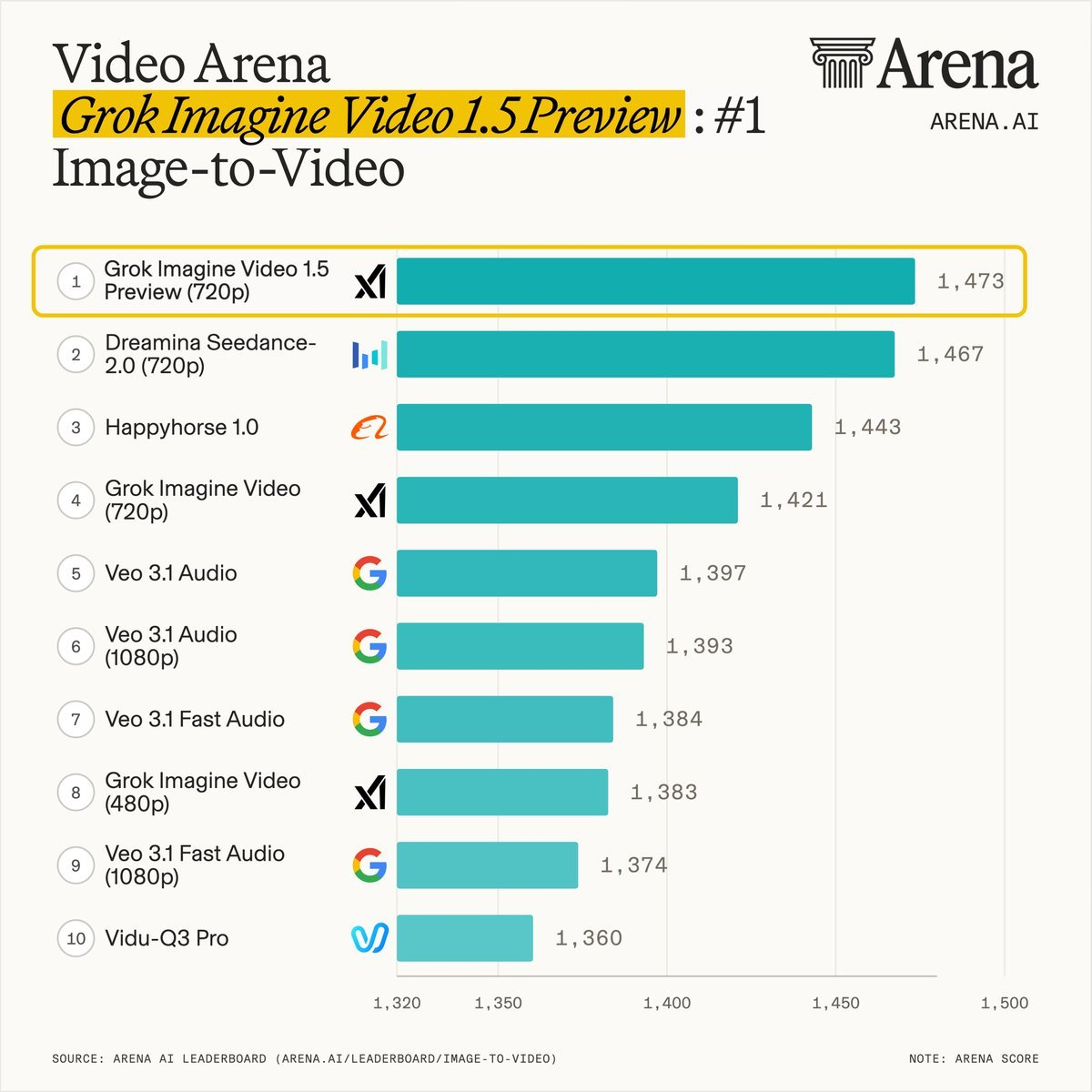
Why choose Grok Imagine 1.5 Video Generator
Grok Imagine 1.5 Video Generator delivers best-in-class image-to-video quality, synchronized native audio, and reliable prompt following for production-ready results.
- Image-to-VideoTransform still images into videos with natural motion, camera movement, and scene transitions
- Native AudioGenerate synchronized dialogue, ambient sound and music together with video
- Reliable Prompt FollowingStronger adherence to complex prompts for consistent character and action behavior
How to Use Grok Imagine 1.5 Video Generator
Generate videos quickly using simple prompts or a reference image and fine-tune duration, aspect ratio and quality.
Grok Imagine 1.5 Video Generator Features
Core capabilities that make Grok Imagine 1.5 a top image-to-video model.
Industry-leading Image-to-Video
High visual fidelity with improved facial expressions, lighting and scene coherence
Native Audio Generation
Create synchronized dialogue, ambient audio and music in a single pass
Realistic Motion
Natural camera movement, character behavior and smooth transitions
Fast, Scalable API
Built for production workloads with predictable performance and clear documentation
Strong Prompt Following
Better adherence to complex instructions for consistent outputs
Easy Integration
Simple endpoints and tooling to add Grok Imagine 1.5 to apps and pipelines
Grok Imagine 1.5 Video Generator — Frequently Asked
Answers about capabilities, integration and model comparisons.
What is Grok Imagine 1.5 Video Generator?
A high-performance image-to-video model that produces realistic videos with native audio and strong prompt adherence.
How can I access Grok Imagine 1.5?
Access the model through our dashboard and API endpoints for testing and production use.
Does it support native audio?
Yes — Grok Imagine 1.5 generates synchronized audio (dialogue, ambient sound, music) together with video.
What resolutions are supported?
Common outputs include 480p, 720p and 1080p. Choose settings based on use case and performance needs.
How does it compare to Seedance 2.0?
Grok Imagine 1.5 ranks highly for fast generation, native audio and prompt fidelity; different models suit different production goals.
Create videos with Grok Imagine 1.5 Video Generator
Produce production-quality videos with native audio, realistic motion and fast, scalable API access.